
Release Overview
Release Date: 02.02.2026This release focuses on improving usability, customization, and planning accuracy across the platform. Feedback and roadmap tools are now integrated into the Resource Center to strengthen user engagement and feature prioritization, while new configuration options—such as organization-level week preferences and CloneOps agent mapping—support greater operational flexibility. Data analysis and efficiency are enhanced through advanced filtering, customizable grids, mileage filters, and bulk tag management via CSV. Significant upgrades to team driver functionality improve scheduling consistency, availability visibility, performance tracking, and replanning support, ensuring team operations are handled as seamlessly and intelligently as solo drivers.
What's New & Improved
1. Feedback Module Integration
What’s New
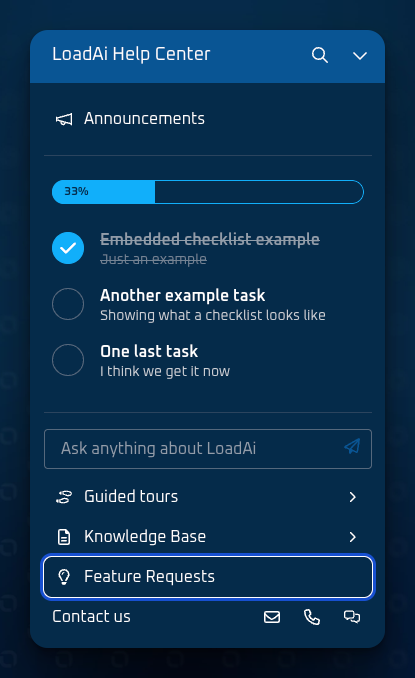
Feature Requests, Roadmap, and Feedback are now integrated into the Resource Center, allowing users to submit feedback and view roadmap items in one place.
2. Enhanced Fuel Stop Page
What’s New
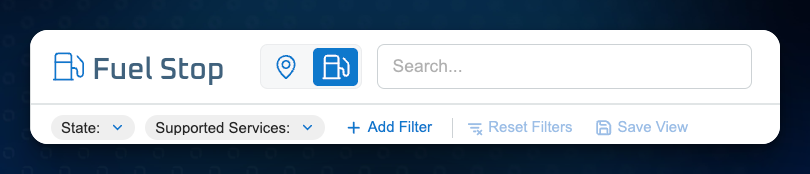
Advanced filtering and sorting options have been added to the Fuel Stop page.
3. Organization-Level Week Preferences
What’s New
Organizations can now configure a system-wide Work Start Week, which is used across all weekly calculations and filters.

4. CloneOps Integration Enhancement
What’s New
LoadAi now supports mapping unique CloneOps agent IDs per organization.
5. Tag Management via CSV
What changedUsers can import, export, and perform bulk edits of tags using CSV files.
6. Mileage Filters for Grids
What’s New
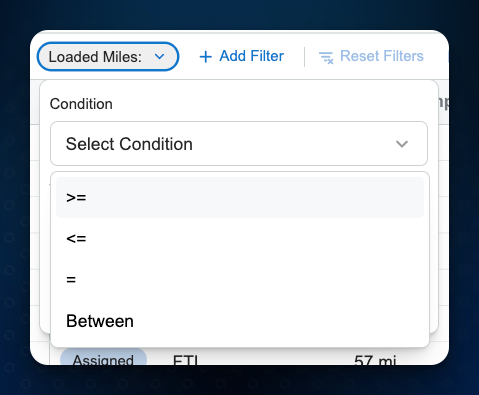
Mileage-based filters are now available on the Trip Grid and Load Grid.
7. Customizable Columns on Balance and Review Page
What’s Changed
Users can now show, hide, reorder, and pin columns on the Trips grid within the Balance and Review pages.

Multiple Enhancements for Team Drivers
a. Consistent Timeline Display for Team Drivers
What’s Changed
Team driver timelines now display consistently with solo drivers across the Gantt and Schedule views.
b. Recurring Time Off for Teams
What’s New
Teams can define recurring time-off rules that automatically generate time-off entries.
c. Weekly Target Summary for Teams
What’s New
A Weekly Target Summary is now available for teams in the Scheduled tab.
d. Ad-Hoc Time Off for Teams
What’s New
Users can add, update, and delete ad-hoc time-off entries for team drivers.
e. Team Preferences Management
What’s New
Team-level planning preferences can now be managed through a dedicated user interface.
f. Recurring Time Off Actions for Teams
What’s Changed
Recurring time-off actions are now supported for teams using the same workflows as solo drivers.
g. Trip Assignment Replanning
What’s New
The Pure Team optimization engine now supports replanning of assigned trips.
Improvements & Refinements
- Improved data management for Team drivers capabilities to align with solo driver operations
- Added filters and column controls for additional pages and attributes
Fixes & Stability Improvements
- Resolved an issue that could cause inconsistent timeline displays in scheduling views.
Rollout Notes
- This release is available in your environment as of the release date.
- No action is required unless otherwise noted.