
Table of Contents
- Key Use Cases
- Navigation Overview
- Fuel Plan Recommendation Panel
- Fuel Optimization Engine Mode Parameters
- Data Dictionary
Fuel Route Optimization is not a base optimization module. If you feel your organization needs fuel route optimization, please contact your Customer Success Manager.
Key Use Cases
- Choose the lowest-cost fuel stops across a driver's planned schedule
- Compare several recommended plans by fuel price, extra fueling time and extra miles
- See each plan on a map next to the driver's trips
- Save the chosen plan to the driver's Schedule tab and the Dispatch Gantt
- Tune planning behavior with the Fuel Optimization engine mode
Navigation Overview
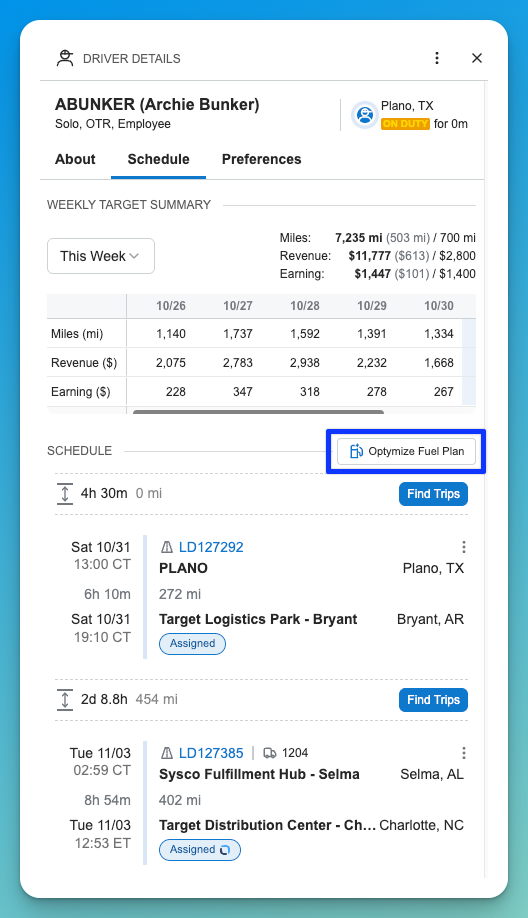
Fuel plans are run from a driver's Schedule tab.
- Open a driver from Dispatch (select the driver's name) to show Driver Details.
- Select the Schedule tab. The Optymize Fuel Plan button sits above the list of trips. Hovering over it shows a short description of the action.
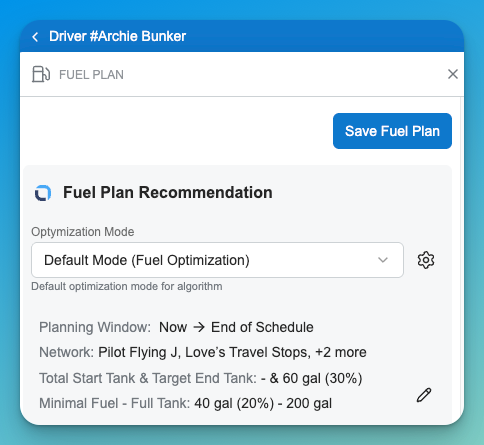
- The Fuel Plan panel opens on the right. Check the Optimization Mode (for example, Default Mode (Fuel Optimization)) and the planning inputs listed under it.
- To change inputs for this run, select the pencil icon. To change the mode itself, select the gear icon, which opens the Fuel Optimization engine mode.
- Review the recommendations. Use the sort control to order them (for example, Low Fuel Price).
- Select the map icon on a recommendation to see its stops on a map beside the driver's schedule.
- Select a recommendation, then select Save Fuel Plan.
Good to know
- Fuel plans are built for one driver at a time. Bulk fuel optimization is not available.
- The planning window runs from now to the end of the driver's schedule.
- Each driver has one saved fuel plan. Saving a new plan replaces the old one.
- Saving a fuel plan does not change trip ETAs on the driver timeline.
- A saved plan is invalidated when trips are added to or removed from the driver's timeline, or when their order changes.
- Fuel Optimization is controlled by its own feature flag. If the button is not visible, ask your administrator to confirm it is enabled.
Fuel Plan Recommendation Panel
The panel shows the mode and inputs used for the run, followed by one card per recommended fuel plan.
|
Element |
Description |
|---|---|
|
Optimization Mode |
The engine mode used for the run. The gear icon opens the Fuel Optimization engine mode. |
|
Planning Window |
The period the plan covers, from now to the end of the driver's schedule. |
|
Network |
The fuel networks whose locations the engine may use (for example, Pilot Flying J and Love's Travel Stops). |
|
Total Start Tank and Target End Tank |
Fuel in the tank at the start of the plan and the level the plan should end with, shown in gallons and as a percentage of full. |
|
Minimal Fuel - Full Tank |
The reserve the tank should not drop below, and the full-tank size, in gallons and percent. |
|
Sort |
Orders the recommendation cards. Available sorts: Low Fuel Price, Low Extra Time Cost, Low Extra Miles, High Total. |
|
Save Fuel Plan |
Saves the selected recommendation to the driver's Schedule tab and the Dispatch Gantt. |
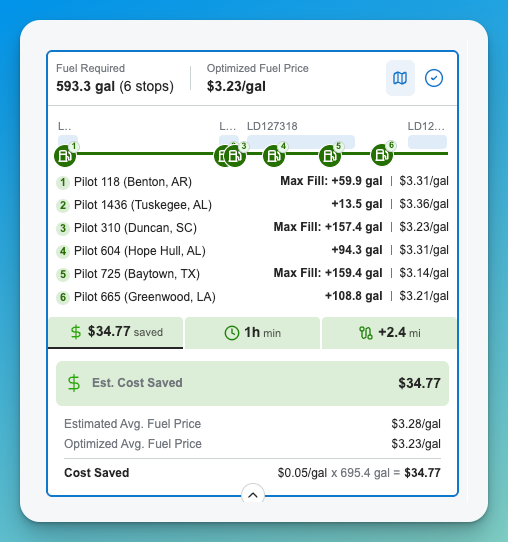
Recommendation card
|
Element |
Description |
|---|---|
|
Fuel Required |
Number of fuel stops and total gallons to buy across the plan, for example 593.3 gal (6 stops). |
|
Optimized Fuel Price |
Average price per gallon across the plan's stops. |
|
Stop list |
Numbered stops in order, each with the station, its location, the gallons to add and the price per gallon. |
|
Max Fill |
Marks a stop where the tank is filled to its maximum. |
|
Estimated cost saved |
Dollar savings the plan achieves against a baseline fuel price. |
|
Estimated extra time |
Total added fueling time across all stops. |
|
Estimated extra miles |
Total miles added by driving off route to reach the stops. |
|
Map icon |
Opens the map for this recommendation. |
|
Selection circle |
Selects the recommendation to save. |
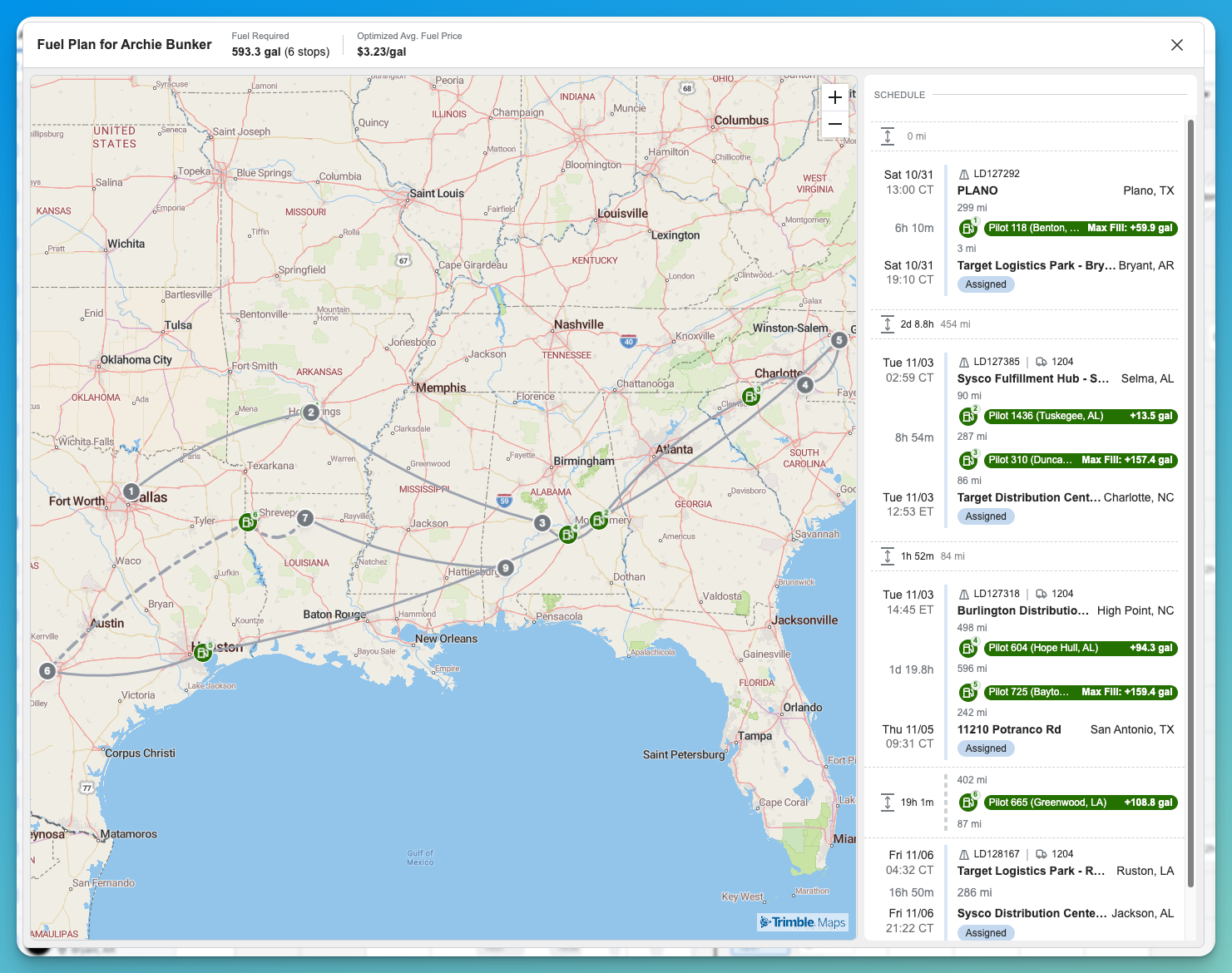
Map and schedule view
The map window is titled Fuel Plan for the driver's name and shows the plan's total fuel required and optimized average price. Numbered markers show the fuel stops along the route. Beside the map, the driver's schedule lists each trip with the fuel stops placed between legs, so you can see where in the schedule each stop falls. After you save a plan, the same fuel stops appear in the driver's Schedule tab and on the Gantt.
Fuel Optimization Engine Mode Parameters
Fuel Optimization has its own engine mode. Open it under Engine > Engine Mode, or from the gear icon in the Fuel Plan panel. Changes to the mode apply to every fuel plan run with it. Values below are the defaults shown in the Default Mode.
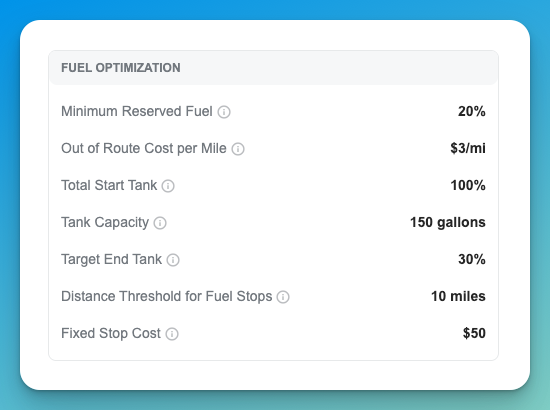
|
Name |
Description |
Example Values |
|---|---|---|
|
Minimum Reserved Fuel |
The lowest fuel level, as a percentage of the tank, the plan should keep in reserve. |
20% |
|
Out of Route Cost per Mile |
Cost the engine adds for each mile driven off route to reach a fuel stop. It helps the engine weigh a cheaper station against the detour needed to reach it. |
$3/mi |
|
Total Start Tank |
Fuel in the tank at the start of the plan, as a percentage of full. |
100% |
|
Tank Capacity |
Size of a full tank. |
150 gallons |
|
Target End Tank |
Fuel level the plan should leave in the tank at the end of the schedule, as a percentage of full. |
30% |
|
Distance Threshold for Fuel Stops |
How far off route a fuel stop can be and still be considered. |
10 miles |
|
Fixed Stop Cost |
Fixed cost the engine adds for each fuel stop. It discourages plans with many short stops. |
$50 |
These inputs can also be updated for a single run from the pencil icon in the Fuel Plan panel. When tractor fuel data from the ELD is available, it is used; if it is not, the values come from the engine mode. You can adjust them by hand before running.
The dollar values here are internal weights the engine uses to compare plans. The savings shown on a recommendation are calculated from fuel prices and gallons.
Data Dictionary
|
Name |
Description |
Data Type |
|---|---|---|
|
Minimum Reserved Fuel |
Lowest fuel level to keep in reserve (% of tank) |
Percentage |
|
Out of Route Cost per Mile |
Cost added per off-route mile to reach a fuel stop |
Currency per mile |
|
Total Start Tank |
Fuel at the start of the plan (% of full) |
Percentage |
|
Tank Capacity |
Full tank size |
Number (gallons) |
|
Target End Tank |
Fuel level to leave at the end of the schedule (% of full) |
Percentage |
|
Distance Threshold for Fuel Stops |
Maximum off-route distance for a stop to be considered |
Number (miles) |
|
Fixed Stop Cost |
Fixed cost added per fuel stop |
Currency |
|
Network |
Fuel networks the plan may use |
List |
|
Fuel Required |
Number of stops and total gallons in a plan |
Integer / Number |
|
Optimized Fuel Price |
Average price per gallon across the plan |
Currency per gallon |
|
Max Fill |
Stop where the tank is filled to its maximum |
Boolean |
|
Estimated Extra Time |
Added fueling time across all stops |
Duration |
|
Estimated Extra Miles |
Miles added by off-route driving to fuel stops |
Number |