
Table of Contents
Key Use Cases
- Maintain driver profiles — identity, employment, operational classification, location, and equipment defaults.
- Configure driver preferences — schedule and home time, preferred/avoided areas, weekly targets, and driving preferences.
- Set and manage pay rates per operation mode (Solo / Team).
- Manage time off — ad-hoc, recurring, and shift-derived.
- Track driver availability — Planned Time Available (PTA), last known location, and current and upcoming trips.
Navigation Overview
Access the module under Planning > Drivers. A driver's name or initials elsewhere in the product — on the Dispatch Gantt and Grid, or on any load or trip — links back to that driver's profile.
The grid provides:
- Solo / Team view toggle in the header — switch between the solo driver list and the team driver list.
- Filters — Active, Employment Type, Fleet, and Operation Type by default, plus + Add Filter for more.
- Search across the driver list.
- Add (+) to create a solo driver (only necessary if not integrated to a TMS system)
- Column controls (gear icon) to show, hide, and pin columns (the Ref. # column can be pinned).
- Export to CSV, which respects your current columns, sort order, and filters.
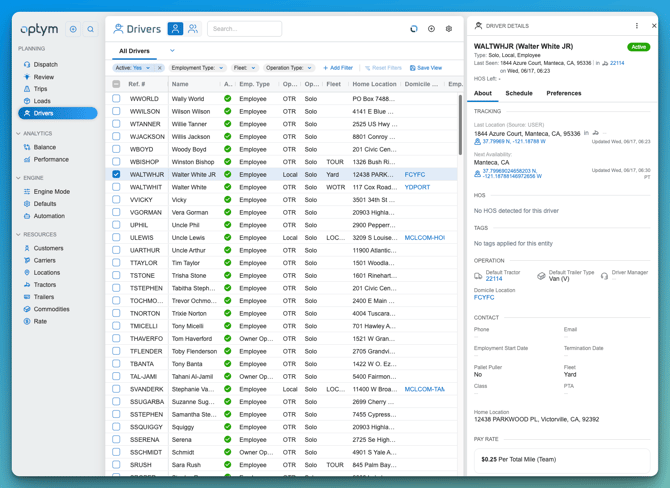
Solo & Team Drivers
Drivers operate in one of two modes:
- Solo — a single driver operating alone. Created directly with Add Driver or through TMS Sync.
- Team — two drivers sharing a tractor. Teams are created automatically when a trip arrives from the TMS with two drivers associated — they can be created from the Add Team Driver workflow but do not need created manually from the Add Driver screen. Switch to the Team view (team icon in the header) to see team pairs, each with a combined reference number and hyperlinks to the Primary and Secondary drivers.
Driver Profile Tabs
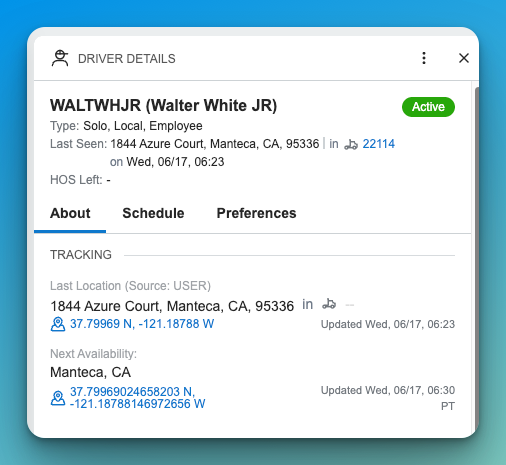
About Tab
Displays the driver’s personal details, contact info, home/domicile location, tractor/trailer defaults, and ELD system IDs.
Schedule Tab
Shows mileage, revenue, and earning metrics across the week, along with current and upcoming trip assignments and time off. This view can be used as a planning workflow since gaps and the FIND A MATCH button are present here. This can also be used if you have fuel optimization to initiate a fuel route recommendation.
Preferences Tab
Captures home time preferences, preferred/avoided areas, workweek settings, and driving conditions.
Adding & Editing a Driver
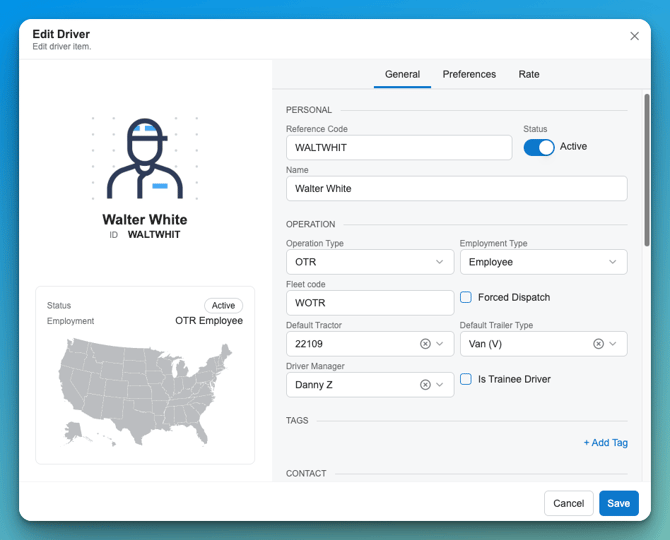
Add Driver (and Edit, which opens the same form pre-filled) uses three tabs:
General — organized into sections:
- Personal — Reference Code, Name, and the Active toggle.
- Operation — Operation Type (OTR / Local / Regional), Employment Type (Employee / Owner Operator), Operation Mode (Solo / Team — read-only, set by the system), Fleet Code, Default Tractor, and Default Trailer Type.
- Tags — driver-level tags used in driver–load matching rules.
- Contact — Phone, Email, home address, Employment Start Date, and Termination Date.
- Driver Location — Home Location, Driver Last Location, and Domicile Location.
- Endorsements — Hazmat and Tanker certification toggles.
- Notes — freeform notes.
Preferences — schedule and home-time settings, preferred and avoided areas, weekly targets, and driving preferences.
Rate — pay setup by Pay Type, Unit, Rate, and Operation Mode (Solo / Team).
Action Menu Options
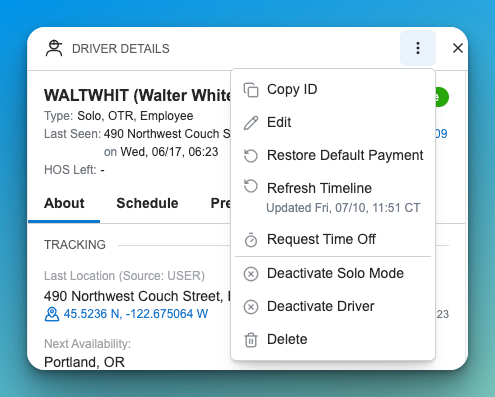
Common actions available from the grid and driver record:
- Add Driver — create a solo driver (team drivers are auto-created from TMS trip sync).
- Edit — open the driver form pre-filled; all tabs editable.
- Activate / Deactivate — toggle Active status (supports bulk). Inactive drivers are excluded from assignment dropdowns; a driver can be deactivated while assigned, with a confirmation.
- Delete — blocked if the driver is part of an active team or has non-completed trip assignments; confirmation shown (supports bulk).
- Restore Default Pay Rates — clears existing pay rates and recreates them from the organization defaults (supports bulk).
- Request Time Off, Copy ID, Refresh Timeline, Deactivate Solo Mode
Data Dictionary
|
Name |
Description |
Data Type |
|---|---|---|
|
Driver Ref. # |
System-generated reference code for internal identification |
String |
|
Name |
Full name of the driver |
String |
|
Status |
Driver availability status (e.g., Available, On Trip) |
Enum/String |
|
Employment Type |
Classification of the driver (e.g., Solo, Team, Employee, Owner Operator) |
Enum |
|
Home Location |
Primary location for home time planning |
String |
|
Domicile Location |
Optional secondary domicile for route planning |
String |
|
Phone |
Contact number |
String |
|
|
Email address |
String |
|
Fleet |
Fleet assignment (e.g., TOUR, OTR) |
String |
|
PTA (Planned Time Avail.) |
The expected time the driver becomes available |
DateTime |
|
Next Available Location |
City/State of next available stop |
String |
|
Next Trip |
Next trip segment (origin > destination) |
String |
|
Tractor / Trailer |
Default assigned equipment |
String |
|
ELD Tractor |
Associated tractor for Hours of Service tracking |
String |
|
License Endorsements |
Certifications such as Hazmat, Tanker, etc. |
List[String] |
|
License Restrictions |
Regulatory limitations such as no manual transmission |
List[String] |
|
Preferred Areas |
Geographies where the driver prefers to run |
List[String] |
|
Avoided Areas |
Geographies the driver prefers to avoid |
List[String] |
|
Work Week Hours |
Max hours allowed to work per week |
Integer |
|
Work Week Days |
Max days allowed to work per week |
Integer |
|
Day/Night Driving |
Driver’s preference or restriction for time of day |
Enum |
|
Sleeper Berth |
Whether driver uses a sleeper berth |
Boolean |
|
DVIR |
Driver Vehicle Inspection Report status |
String |
|
Revenue / Miles / Earnings |
Current week-to-date values by day and week summary |
Number |
|
External System ID |
ID used for TMS/ELD integration |
String |
|
Reference Code |
System ID used for API/data sync |
String |
|
Start Date |
Driver’s employment start date |
Date |
|
Notes |
Freeform comments field |
String |